

这篇来自 Vercel 的文章展示了 Mux 如何利用 Vercel 的 Workflow DevKit 构建他们的 @mux/ai SDK,实现了可靠且生产就绪的 AI 视频工作流。它解决了 AI 工作流的常见痛点,如因网络问题或速率限制导致的故障,并解释了持久化执行如何在不涉及复杂基础设施的情况下提供自动重试、状态持久化和可观测性。核心创新在于 Workflow DevKit 能够让相同的代码在任何 Node.js 环境中运行,同时在部署到 Workflow DevKit 环境时获得持久性保证。文章详细介绍了工作流原则,如无硬性基础设施要求、可选持久性和熟悉的 JavaScript 模式。还提供了实用的代码示例,强调了 Vercel 用户的优势(零基础设施配置、内置可观测性、自动扩展),并列出了可以使用该 SDK 构建的各种视频 AI 任务,如摘要、内容审核和翻译。
5 min read
We invited Dylan Jhaveri from Mux to share how they shipped durable workflows with their @mux/ai SDK.
AI workflows have a frustrating habit of failing halfway through. Your content moderation check passes, you're generating video chapters, and then you hit a network timeout, a rate limit, or a random 500 from a provider having a bad day. Now you're stuck. Do you restart from scratch and pay for that moderation check again? Or do you write a bunch of state management code to remember where you left off?
This is where durable execution changes everything.
When we set out to build @mux/ai, an open-source SDK to help our customers build AI features on top of Mux's video infrastructure, we faced a fundamental question: how do we ship durable workflows in a way that's easy for developers to adopt, without forcing them into complex infrastructure decisions?
The answer was Vercel's Workflow DevKit.
Link to heading
The problem with AI video pipelines
A typical video AI workflow might look like this:
-
Use the Mux API to fetch video metadata
-
Use the Mux API to auto-generate a transcript
-
Use the Mux API to fetch thumbnail images and/or the storyboard for the video
-
Use an LLM to run content moderation, to make sure the video fits your content policy
-
Use an LLM to generate a summary and tags
-
Use an LLM to generate chapters
-
Use an LLM to generate translated subtitles in other languages
In order to implement this correctly, you need to build custom orchestration with message queues, state machines, retry logic, and observability. Everything that goes into production-grade infrastructure for long-running tasks. That's not what developers want when they're trying to ship features.
Link to heading
Why Workflow DevKit was the right fit
When evaluating solutions, we had clear principles:
-
No hard infrastructure requirements. You should be able to run functions from
@mux/aiin any Node.js environment, just like a normal SDK. -
Opt-in durability. If you want persistence, observability, and error handling, layering that in should be trivial.
-
Familiar patterns. No new DSLs, no YAML, no state machine definitions. Just JavaScript.
Workflow DevKit delivers on all of these. The "use workflow" and "use step" directives let us mark functions in the SDK for durable execution without changing how you write code. If you're in a standard Node environment, those directives are ignored. It's a no-op. If you're running in a Workflow DevKit environment, they give you automatic retries, state persistence, and observability.
This is the key insight with Workflow DevKit: the same code works everywhere, but gains durability guarantees when deployed to the right environment. And we're supporting Workflow DevKit without taking on an explicit dependency. If you're using Workflow DevKit: great, you get all the benefits that come with that. If you're not: no worries, you can still use @mux/ai as a normal Node package.
All the other options we considered would have required either taking on a specific third-party dependency and tying ourselves to one option, or building a more complex API surface so developers could add wrapping functions around each discrete step. It wasn't impossible, but it would have required a much bigger lift and a whole set of new decisions.
Link to heading
How it works in practice
Here's what a durable video AI workflow looks like with @mux/ai:
import { getSummaryAndTags, getModerationScores } from '@mux/ai/workflows';
export async function processVideo(assetId: string) {  "use workflow";    const summaryResp = await getSummaryAndTags(assetId);  // ✅ Step succeeds. The summaryResp is persisted.    const moderationResp = await getModerationScores(assetId, {    thresholds: { sexual: 0.7, violence: 0.8 }  });  // ❌ Step fails. Workflow is suspended.  // ✅ Replay happens and picks back up right here  //    without re-doing the getSummaryAndTags work above.  // ✅ Step succeeds. The moderationResp is persisted.
  // With Workflow DevKit, you can nest your own "use workflow"  // and "use step" functions inside a larger "use workflow"  const emailResp = await emailUser(assetId);  // ✅ The nested workflow succeeds. Each step  //    inside your emailUser workflow is treated as an  //    isolated step.
  return { summaryResp, moderationResp, emailResp };}
Here's what it looks like in the observability dashboard when a step fails on the first run, then gets retried 2 seconds later and succeeds:
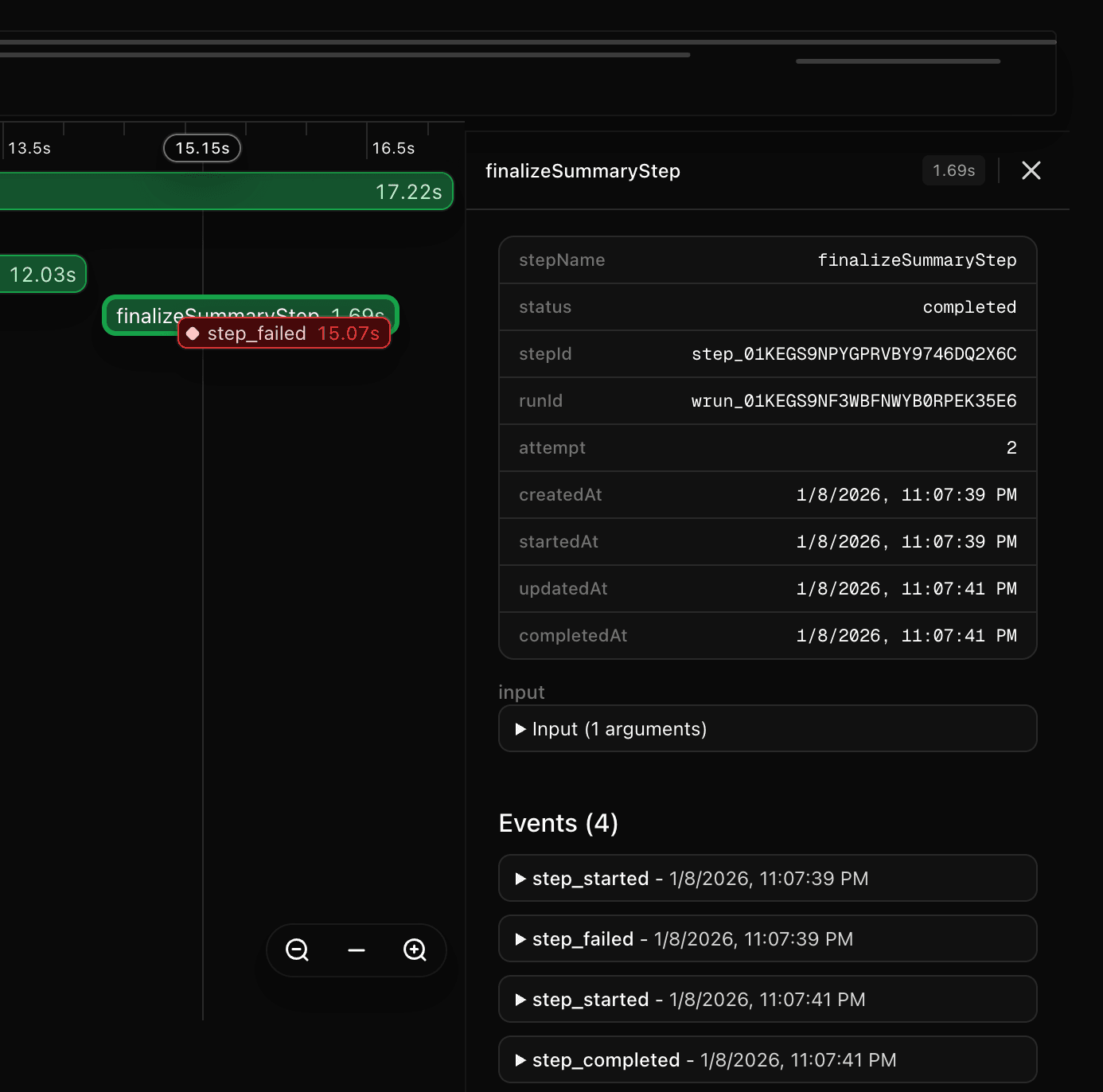
Each "use step" function runs in isolation. If the moderation API fails after you've already generated the summary and tags, the workflow resumes from where it left off. You don't lose the work you've already paid for. The execution is distributed across multiple serverless function invocations, so long-running AI operations never hit timeout limits.
The @mux/ai SDK also ships with primitives, which are lower-level singular units of work like fetchTranscriptForAsset and getStoryboardUrl. These have been exported with "use step" directives, so you can pull them into your own workflows and treat them as discrete steps.
Link to heading
Deploy anywhere, scale on Vercel
Workflow DevKit is designed with portability in mind through the concept of "Worlds." A World is where workflow state gets stored. Locally it's JSON files on disk. On Vercel it's managed for you. Or you can self-host with Postgres, Redis, or build your own. The easiest path is to develop and test locally with the Local World, then deploy to Vercel where everything is provisioned automatically, including the observability dashboard. This is the default zero-configuration experience.
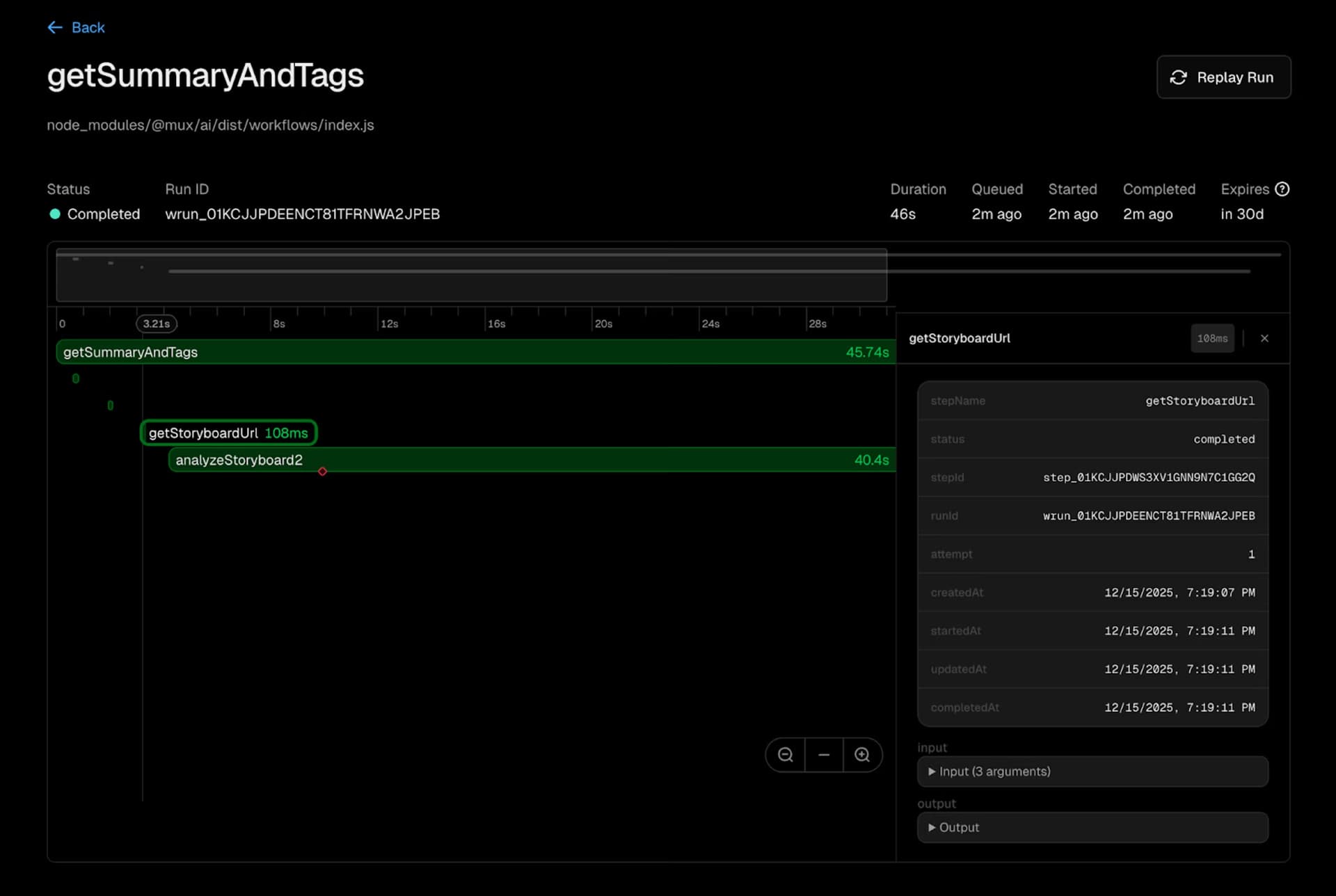
For teams deploying to Vercel, this means:
-
Zero infrastructure configuration. Vercel detects durable functions and handles provisioning for you.
-
Built-in observability. Traces, logs, and metrics for every workflow run. Debug by replaying execution or time-traveling through state.
-
Automatic scaling. Whether you're processing ten videos or ten thousand, the platform adapts without manual intervention.
Link to heading
What you can build
@mux/ai ships with pre-built workflows for common video AI tasks:
-
Summaries and tags: Automatically understand and categorize your video library
-
Chapter generation: Create navigation points based on content structure
-
Content moderation: Flag problematic content before it reaches users
-
Translation and dubbing: Make videos accessible in multiple languages
-
Embeddings: Generate embeddings for nearest neighbor search
All workflows are model-agnostic. Use OpenAI, Anthropic, or Gemini depending on the task. Everything is open source under Apache 2.0, so you can fork, modify, and extend as needed.
Link to heading
Getting started
npm install @mux/ai
For local development, workflows run without any additional setup. To enable durability on Vercel, add the Workflow DevKit integration to your project. The same code you test locally behaves identically when deployed at scale.
Check out the full documentation for comprehensive guides and examples. We're building this in the open with live eval results, public CI, and comprehensive test coverage. PRs welcome.
Link to heading
What's next
Video AI is just the beginning. The pattern of durable execution applies anywhere you have multi-step processes with external dependencies: document processing pipelines, data synchronization workflows, agent orchestration. Workflow DevKit provides the foundation; the use cases are up to you.
We're excited to see what you build. Drop us a note with what you're working on, and let us know if there are workflows we haven't thought of yet.
Link to heading
Resources
-
Launching durable AI workflows on the Mux blog
-
Next.js template with code examples
This post was written by Dylan Jhaveri and the team at Mux, who build video infrastructure for developers. @mux/ai integrates with Workflow DevKit to make AI video workflows production-ready without extra infrastructure.