

本文介绍了谷歌的 Gemini 2.5 计算机使用模型,该模型是基于 Gemini 2.5 Pro 的视觉理解和推理能力构建的专业 AI 代理。此模型允许 AI 代理通过模仿人类的操作(如点击、打字和滚动)与图形用户界面 (UI) 交互,从而实现复杂数字任务的自动化,例如填写表格和操作交互元素。核心功能通过 Gemini API 中的 `computer_use` 工具开放,该工具在一个迭代循环中运行,模型分析屏幕截图和用户请求以生成相应的 UI 操作。该模型主要针对网页浏览器进行了优化,并在移动 UI 控制方面显示出强大的潜力,在多个网页和移动控制基准测试中展示了顶尖性能,以低延迟提供高精度。谷歌强调对安全负责的态度,将功能直接集成到模型中,并为开发者提供安全控制,例如每一步操作评估和高风险操作的用户确认。包括谷歌团队在内的早期测试人员已成功将该模型应用于 UI 测试、工作流自动化和个人助理,并报告了效率和可靠性的显著提高。该模型现已在 Google AI Studio 和 Vertex AI 上提供公开预览版。
Earlier this year, we mentioned that we're bringing computer use capabilities to developers via the Gemini API. Today, we are releasing the Gemini 2.5 Computer Use model, our new specialized model built on Gemini 2.5 Pro’s visual understanding and reasoning capabilities that powers agents capable of interacting with user interfaces (UIs). It outperforms leading alternatives on multiple web and mobile control benchmarks, all with lower latency. Developers can access these capabilities via the Gemini API in Google AI Studio and Vertex AI.
While AI models can interface with software through structured APIs, many digital tasks still require direct interaction with graphical user interfaces, for example, filling and submitting forms. To complete these tasks, agents must navigate web pages and applications just as humans do: by clicking, typing and scrolling. The ability to natively fill out forms, manipulate interactive elements like dropdowns and filters, and operate behind logins is a crucial next step in building powerful, general-purpose agents.
How it works
The model’s core capabilities are exposed through the new `computer_use` tool in the Gemini API and should be operated within a loop. Inputs to the tool are the user request, screenshot of the environment, and a history of recent actions. The input can also specify whether to exclude functions from the full list of supported UI actions or specify additional custom functions to include.
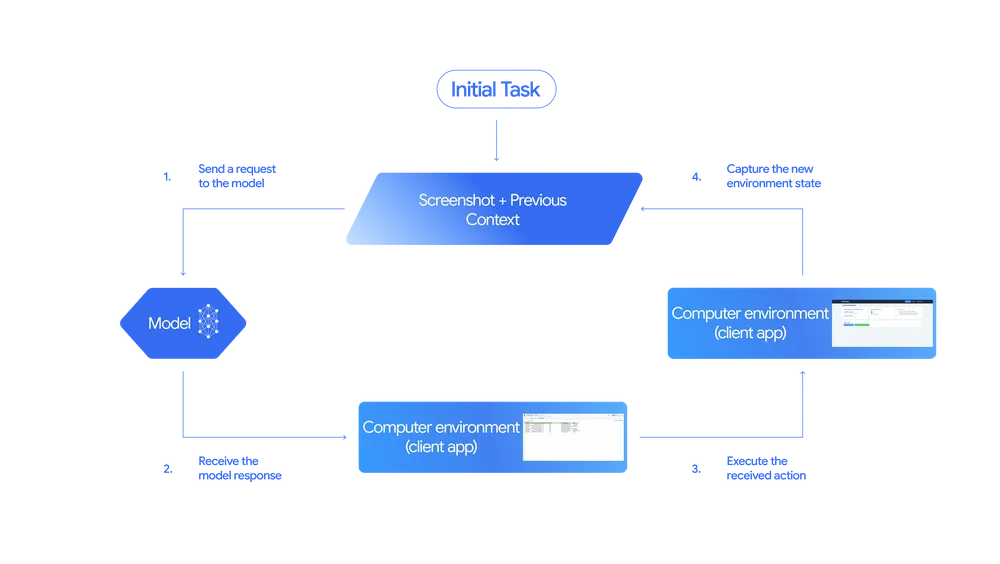
Gemini 2.5 Computer Use Model flow
The model then analyzes these inputs and generates a response, typically a function call representing one of the UI actions such as clicking or typing. This response may also contain a request for an end user confirmation, which is required for certain actions such as making a purchase. The client-side code then executes the received action.
After the action is executed, a new screenshot of the GUI and the current URL are sent back to the Computer Use model as a function response restarting the loop. This iterative process continues until the task is complete, an error occurs or the interaction is terminated by a safety response or user decision.
The Gemini 2.5 Computer Use model is primarily optimized for web browsers, but also demonstrates strong promise for mobile UI control tasks. It is not yet optimized for desktop OS-level control.
Check out a few demos below to see the model in action (shown here at 3X speed).
Prompt: “From https://tinyurl.com/pet-care-signup, get all details for any pet with a California residency and add them as a guest in my spa CRM at https://pet-luxe-spa.web.app/. Then, set up a follow up visit appointment with the specialist Anima Lavar for October 10th anytime after 8am. The reason for the visit is the same as their requested treatment.”
Prompt: “My art club brainstormed tasks ahead of our fair. The board is chaotic and I need your help organizing the tasks into some categories I created. Go to sticky-note-jam.web.app and ensure notes are clearly in the right sections. Drag them there if not.”
How it performs
The Gemini 2.5 Computer Use model demonstrates strong performance on multiple web and mobile control benchmarks. The table below includes results from self-reported numbers, evaluations run by Browserbase and evaluations we ran ourselves. Evaluation details are available in the Gemini 2.5 Computer Use evaluation info and in Browserbase’s blog post. Unless otherwise indicated, scores shown are for computer use tools exposed via API.
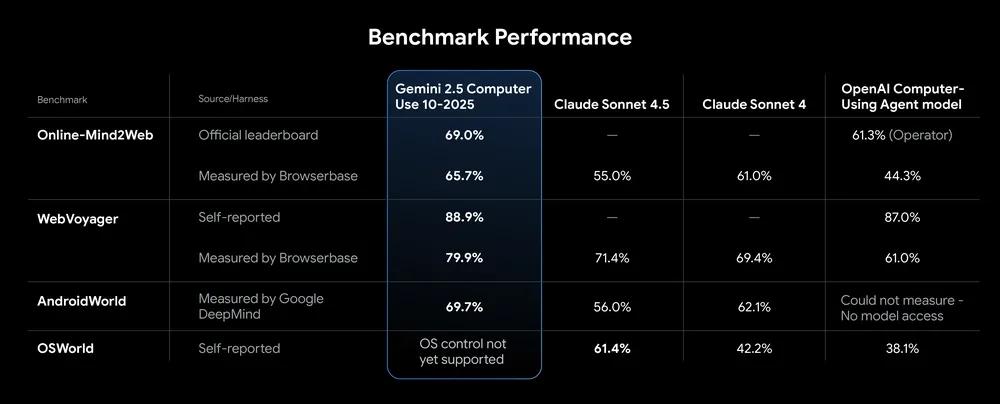
Gemini 2.5 Computer Use outperforms leading alternatives on multiple benchmarks
The model offers leading quality for browser control at the lowest latency, as measured by performance on the Browserbase harness for Online-Mind2Web.
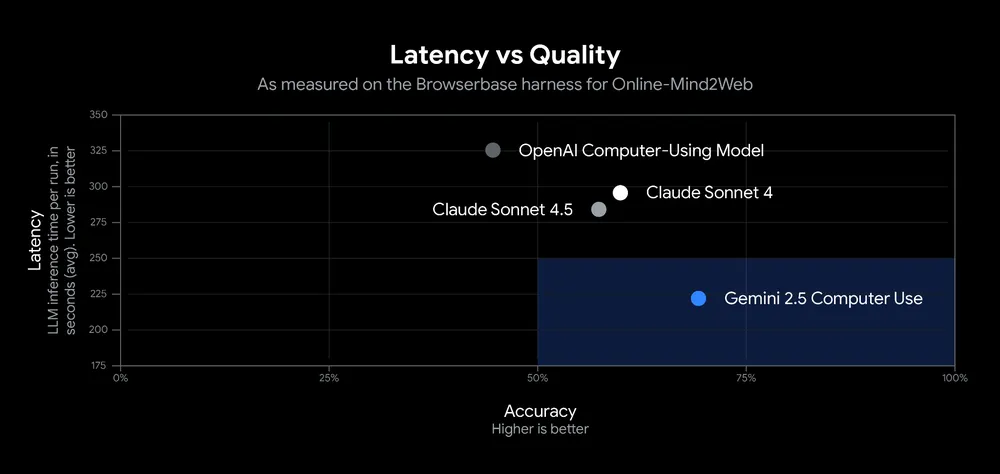
Gemini 2.5 Computer Use delivers high accuracy while maintaining low latency
How we approached safety
We believe that the only way to build agents that will benefit everyone is to be responsible from the start. AI agents that control computers introduce unique risks, including intentional misuse by users, unexpected model behavior, and prompt injections and scams in the web environment. Thus, it is critical to implement safety guardrails with care.
We have trained safety features directly into the model to address these three key risks (described in the Gemini 2.5 Computer Use System Card).
Further, we also provide developers with safety controls, which empower developers to prevent the model from auto-completing potentially high-risk or harmful actions. Examples of these actions include harming a system's integrity, compromising security, bypassing CAPTCHAs, or controlling medical devices. The controls:
- Per-step safety service: An out-of-model, inference-time safety service that assesses each action the model proposes before it’s executed.
- System instructions: Developers can further specify that the agent either refuses or asks for user confirmation before it takes specific kinds of high-stakes actions. (Example in documentation).
Additional recommendations for developers on safety measures and best practices can be found in our documentation. While these safeguards are designed to reduce risk, we urge all developers to thoroughly test their systems before launch.
How early testers have used it
Google teams have already deployed the model to production for use cases including UI testing, which can make software development signficantly faster. Versions of this model have also been powering Project Mariner, the Firebase Testing Agent, and some agentic capabilities in AI Mode in Search.
Users from our early access program have also been testing the model to power personal assistants, workflow automation, and UI testing, and have seen strong results. In their own words:
“A lot of our workflows require interacting with interfaces meant for humans where speed is especially important. Gemini 2.5 Computer Use is far ahead of the competition, often being 50% faster and better than the next best solutions we’ve considered.” - Poke.com, a proactive AI assistant in iMessage, WhatsApp and SMS with multiple third-party and agentic workflows.
“Our agents run fully autonomously, performing work where small mistakes in collecting and parsing data are unacceptable. Gemini 2.5 Computer Use outperformed other models at reliably parsing context in complex cases, increasing performance by up to 18% on our hardest evals.” — Autotab, a drop-in AI agent.
“When conventional scripts encounter failures, the model assesses the current screen state and autonomously ascertains the required actions to complete the workflow. This implementation now successfully rehabilitates over 60% of executions (which used to take multiple days to fix).” — Google’s payments platform team, which implemented the Computer Use model as a contingency mechanism to address fragile end-to-end UI tests that contributed to 25% of all test failures.
How to get started
Starting today, the model is available in public preview, accessible via the Gemini API on Google AI Studio and Vertex AI.
- Try it now: In a demo environment hosted by Browserbase.
- Start building: Dive into our reference and documentation (see Vertex AI docs for enterprise use) to learn how to build your own agent loop locally with Playwright or in a cloud VM with Browserbase.
- Join the community: We’re excited to see what you build. Share feedback and help guide our roadmap in our Developer Forum.